<!DOCTYPE html>
    <html lang="vi" xmlns="http://www.w3.org/1999/xhtml" prefix="og: http://ogp.me/ns#">
    <head>
<title>Khắc phục sự cố hàng loạt máy tính hoặc các thiết bị đều bị lỗi &quot;kết nối riêng tư&quot;</title>
<meta name="description" content="Khắc phục sự cố hàng loạt máy tính hoặc các thiết bị đều bị lỗi &quot;kết nối riêng tư&quot; - Savefile - Tin Tức -...">
<meta name="author" content="Công ty cổ phần phát triển nguồn mở Việt Nam - VINADES.,JSC">
<meta name="copyright" content="Công ty cổ phần phát triển nguồn mở Việt Nam - VINADES.,JSC [contact@vinades.vn]">
<meta name="google-site-verification" content="NGkYMKsfhngdmgUlGlx8uygrdLtYjopya1XLsynDffY">
<meta name="generator" content="NukeViet v5.0">
<meta name="viewport" content="width=device-width, initial-scale=1">
<meta http-equiv="Content-Type" content="text/html; charset=utf-8">
<meta property="og:title" content="Khắc phục sự cố hàng loạt máy tính hoặc các thiết bị đều bị lỗi &quot;kết nối riêng tư&quot;">
<meta property="og:type" content="website">
<meta property="og:description" content="Savefile - Tin Tức - https&#x3A;&#x002F;&#x002F;vinades.vn&#x002F;vi&#x002F;news&#x002F;savefile&#x002F;tin-cong-nghe&#x002F;khac-phuc-su-co-hang-loat-may-tinh-hoac-cac-thiet-bi-deu-bi-loi-ket-noi-rieng-tu-540.html">
<meta property="og:site_name" content="Công ty cổ phần phát triển nguồn mở Việt Nam - VINADES.,JSC">
<meta property="og:url" content="https://vinades.vn/vi/news/savefile/tin-cong-nghe/khac-phuc-su-co-hang-loat-may-tinh-hoac-cac-thiet-bi-deu-bi-loi-ket-noi-rieng-tu-540.html">
<link rel="shortcut icon" href="https://www.vinades.vn/uploads/favicon.ico">
<link rel="canonical" href="https://vinades.vn/vi/news/savefile/tin-cong-nghe/khac-phuc-su-co-hang-loat-may-tinh-hoac-cac-thiet-bi-deu-bi-loi-ket-noi-rieng-tu-540.html">
<link rel="alternate" href="https://www.vinades.vn/vi/news/rss/" title="Tin Tức" type="application/rss+xml">
<link rel="alternate" href="https://www.vinades.vn/vi/news/rss/thong-cao-bao-chi/" title="Tin Tức - Thông cáo báo chí" type="application/rss+xml">
<link rel="alternate" href="https://www.vinades.vn/vi/news/rss/tin-vinades/" title="Tin Tức - Bản tin VINADES" type="application/rss+xml">
<link rel="alternate" href="https://www.vinades.vn/vi/news/rss/Bao-chi-viet/" title="Tin Tức - Báo chí viết" type="application/rss+xml">
<link rel="alternate" href="https://www.vinades.vn/vi/news/rss/San-pham/" title="Tin Tức - Tin sản phẩm &amp; dịch vụ" type="application/rss+xml">
<link rel="alternate" href="https://www.vinades.vn/vi/news/rss/tiep-thi/" title="Tin Tức - Tiếp thị số" type="application/rss+xml">
<link rel="alternate" href="https://www.vinades.vn/vi/news/rss/doi-tac/" title="Tin Tức - Đối tác &amp; Hợp tác" type="application/rss+xml">
<link rel="alternate" href="https://www.vinades.vn/vi/news/rss/Tuyen-dung/" title="Tin Tức - Tuyển dụng" type="application/rss+xml">
<link rel="alternate" href="https://www.vinades.vn/vi/news/rss/tin-cong-nghe/" title="Tin Tức - Điểm tin công nghệ" type="application/rss+xml">
<link rel="stylesheet" href="/assets/css/core.r.min.css?t=1780135445">
<link rel="StyleSheet" href="https://www.vinades.vn/assets/css/font-awesome.min.css">
<link rel="StyleSheet" href="https://www.vinades.vn/themes/vinades/css/bootstrap.min.css">
<link rel="StyleSheet" href="https://www.vinades.vn/themes/vinades/css/style.css">
<link rel="StyleSheet" href="https://www.vinades.vn/themes/vinades/css/style.responsive.css">
<link rel="stylesheet" href="https://www.vinades.vn/themes/vinades/css/news.css">
<link rel="StyleSheet" href="https://www.vinades.vn/themes/vinades/css/custom.css">
<link rel="StyleSheet" href="https://www.vinades.vn/assets/css/vinades.vi.0.css?t=1780135445">
<style type="text/css">
    body{background: #fff;}
</style>
<script>(function(i,s,o,g,r,a,m){i['GoogleAnalyticsObject']=r;i[r]=i[r]||function(){
(i[r].q=i[r].q||[]).push(arguments)},i[r].l=1*new Date();a=s.createElement(o),
m=s.getElementsByTagName(o)[0];a.async=1;a.src=g;m.parentNode.insertBefore(a,m)
})(window,document,'script','https://www.google-analytics.com/analytics.js','ga');
ga('create', 'UA-127394949-1', '');
ga('send', 'pageview');
</script>
</head>
    <body>
<div id="print">
    <div id="hd_print">
        <h2 class="pull-left">Công ty cổ phần phát triển nguồn mở Việt Nam - VINADES.,JSC</h2>
        <p class="pull-right"><a title="Công ty cổ phần phát triển nguồn mở Việt Nam - VINADES.,JSC" href="https://www.vinades.vn/">https://www.vinades.vn</a></p>
    </div>
    <div class="clear"></div>
    <hr />
    <div id="content">
        <h1>Khắc phục sự cố hàng loạt máy tính hoặc các thiết bị đều bị lỗi &quot;kết nối riêng tư&quot;</h1>
        <ul class="list-inline">
            <li>Thứ sáu, 08 Tháng Mười 2021 8:56 CH</li>
            <li class="hidden-print txtrequired"><em class="fa fa-print">&nbsp;</em><a title="In ra" href="https://www.vinades.vn/#" data-toggle="winCMD" data-cmd="print">In ra</a></li>
            <li class="hidden-print txtrequired"><em class="fa fa-power-off">&nbsp;</em><a title="Đóng cửa sổ này" href="https://www.vinades.vn/#"  data-toggle="winCMD" data-cmd="close">Đóng cửa sổ này</a></li>
        </ul>
        <div class="clear"></div>
        <div id="hometext">
            Ngày 30/9/2021, chứng chỉ gốc DST Root CA X3 của Let&#039;s Encrypt bị hết hạn và phải thay bằng chứng chỉ mới. Điều này đã gây ra sự cố truy cập cho hàng loạt thiết bị và trang web trên toàn cầu. Các trang web sử dụng SSL miễn phí, thiết bị cũ và thiết bị iOS bị ảnh hưởng nhiều nhất.
        </div>
        <div id="bodytext" class="clearfix">
            Vừa qua ngày 30/9/2021 các chứng chỉ của&nbsp;Let&#039;s Encrypt bị hết hạn điều này khiến cho hoàn loạt các thiết bị và trang web trên toàn cầu đều không thể truy cập được.<br />
Để khắc phục vấn đề này thì nay công ty cổ phần phát triển nguồn mở Việt Nam sẽ hướng dẫn bạn đọc các cách để khắc phục vấn đề kết nối riêng tư trên các thiết bị máy tính cá nhân nhằm giúp bạn đọc có thể truy cập các website một cách bình thường
<h2><br />
Cách 1: Cập nhật thiết bị di động, máy tính lên phiên bản mới nhất</h2>
Nếu bạn đọc đang sử dụng các thiết bị di động, máy tính nhưng chưa update lên các phiên bản mới nhất cũng như hệ điều hành mới nhất thì các bạn hãy cập nhật các thiết bị di động, máy tính lên phiên bản mới nhất<br />
Để biết các thiết bị nào cần cập nhật lên phiên bản mới nhất. Các bạn tham khảo bài viết&nbsp;<a href="https://vinades.vn/vi/news/tin-cong-nghe/hang-loat-thiet-bi-va-trang-web-gap-su-co-khong-the-truy-cap-do-let-s-encrypt-het-han-chung-chi-goc-538.html">Hàng loạt thiết bị và trang web gặp sự cố không thể truy cập do Let&#039;s Encrypt hết hạn chứng chỉ gốc</a>&nbsp;
<h2><br />
Cách 2: Sử dụng trình duyệt Firefox</h2>
Những trình duyệt Chrome, Safari, Edge, Opera thường tin tưởng và sử dụng các Root Certificates của hệ điều hành mà chúng đang chạy để xác thực phía máy chủ. Riêng&nbsp;<strong>Firefox</strong>&nbsp;là ngoại lệ, nó có kho lưu trữ root certificates của riêng mình, vì vậy bạn chỉ cần tải hoặc cập nhật Firefox lên bản mới nhất là có thể truy cập kết nối an toàn.
<h2><br />
Cách 3: Sửa đổi chứng chỉ</h2>
Nếu các máy tính các bạn hiện đang dùng windows 10,11 nhưng vẫn không thể truy cập được thì có thể tham khảo cách sửa đổi chứng chỉ như sau<br />
- Cho phép hiển thị đuôi file trong windows

<div class="image-center"><img alt="Hiển thị đuôi file trong windows" height="98" src="https://www.vinades.vn/uploads/news/2021_10/hien-thi-duoi-file.png" width="600" /></div>
<div style="text-align: center;"><em>Hiển thị đuôi file trong windows 10</em><br />
&nbsp;</div>
<div>- Tải file về theo địa chỉ:&nbsp;<a aria-describedby="sk-tooltip-256" data-sk="tooltip_parent" data-stringify-link="https://community.letsencrypt.org/uploads/short-url/wcih8HKc9jXHDM73NEyH4n2Wu7v.txt" delay="150" href="https://community.letsencrypt.org/uploads/short-url/wcih8HKc9jXHDM73NEyH4n2Wu7v.txt" rel="noopener noreferrer nofollow" target="_blank">https://community.letsencrypt.org/uploads/short-url/wcih8HKc9jXHDM73NEyH4n2Wu7v.txt</a><br />
- Khi bạn tải về file sẽ có tên là&nbsp;ISRG Root X1 - HKLM - AuthRoot.reg.txt bạn hay đổi lại tên file thành ISRG Root X1 - HKLM - AuthRoot.reg<br />
- Click trực tiếp&nbsp;vào file vừa đổi tên (ISRG Root X1 - HKLM - AuthRoot.reg) để khởi chạy.<br />
- Tắt hết các trình duyệt và sau đó thử lại<br />
<br />
Nếu các cách trên mà bạn đọc&nbsp;vẫn chưa thể truy cập được vào website thì có thể thử cách sau<br />
&nbsp;</div>
<h3><strong>Tải và cập nhật chứng chỉ ISRG Root X1 cho hệ điều hành theo cách thủ công</strong></h3>
<ul>
	<li><strong>Tải về chứng chỉ gốc ISRG Root X1 =&gt;</strong>&nbsp;<strong><a href="https://letsencrypt.org/certs/isrgrootx1.der" rel="noreferrer noopener nofollow" target="_blank">isrgrootx1.der</a></strong></li>
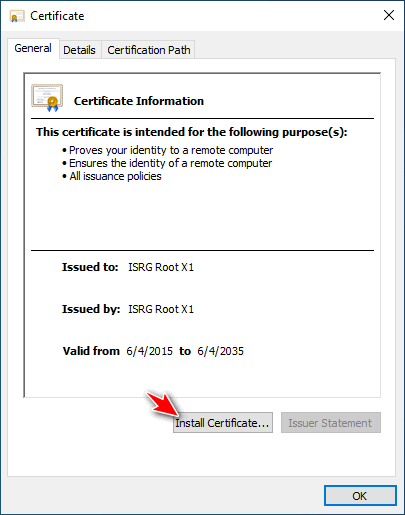
	<li>Sau khi tải về bạn click đúp vào file để tiến hành cài đặt</li>
	<li>Chọn&nbsp;<strong>Install Certificate</strong></li>
</ul>
<div class="image-center"><img alt="Cài đặt ISRG Root X1" height="515" src="https://www.vinades.vn/uploads/news/2021_10/isrg-root-x1-hinh-1.png" width="405" /></div>
<div style="text-align: center;"><em>Cài đặt ISRG Root X1</em></div>
<ul>
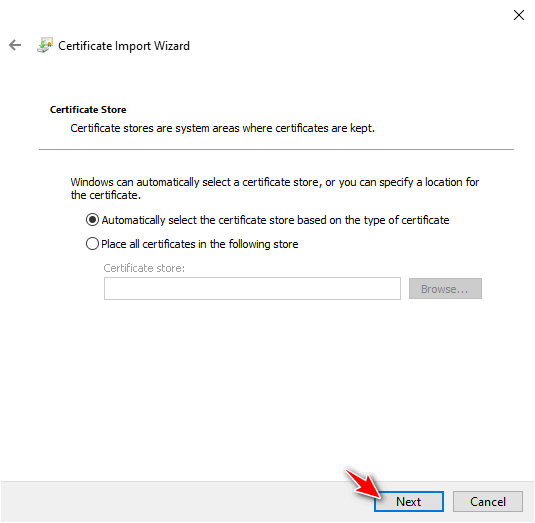
	<li>Chọn&nbsp;<strong>Current User</strong>, nhấn&nbsp;<strong>Next</strong>.</li>
	<li>Các bạn để mặc định “<strong>Automatically select the certificate store based on the type of certificate”</strong>&nbsp;nhấn&nbsp;<strong>Next</strong>, nó sẽ tự động chọn kho lưu trữ chứng chỉ dựa trên loại chứng chỉ (hoặc bạn có thể tick vào dòng thứ 2 để import thủ công vào 2 kho lưu trữ Trusted Root và Intermediate)</li>
</ul>
<div class="image-center"><img alt="Cài đặt ISRG Root X1 hình 2" height="523" src="https://www.vinades.vn/uploads/news/2021_10/isrg-root-x1-hinh-2.png" width="535" /></div>
<div style="text-align: center;"><em>Cài đặt ISRG Root X1 (hình 2)</em></div>
<div>&nbsp;
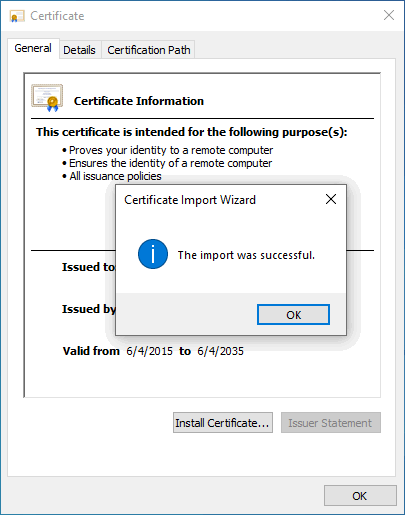
<div class="image-center"><img alt="Cài đặt ISRG Root X1 hình 3" height="515" src="https://www.vinades.vn/uploads/news/2021_10/isrg-root-x1-hinh-3.png" width="405" /></div>
<div style="text-align: center;"><em>Cài đặt ISRG Root X1 (hình 3)</em><br />
​​​​​</div>
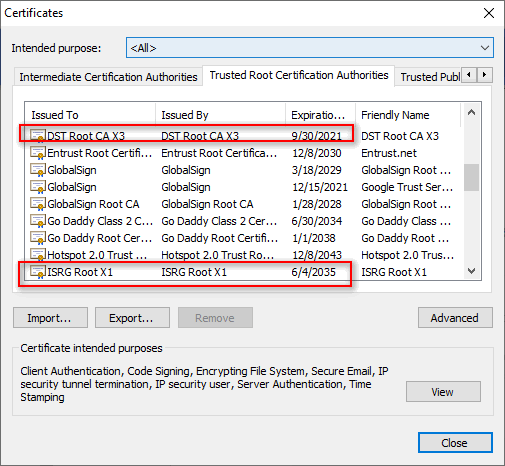
<div>Sau khi Import thành công bạn hãy tắt và khởi động trình duyệt web, truy cập lại địa chỉ website đang bị lỗi kết nối riêng tư, vấn đề đã được khắc phục, kết nối bây giờ là an toàn.<br />
&nbsp;
<div class="image-center"><img alt="Cài thành công ISRG Root X1" height="466" src="https://www.vinades.vn/uploads/news/2021_10/isrg-root-x1-hinh-5.png" width="505" /></div>
<div>
<div style="text-align: center;"><em>Cài thành công ISRG Root X1</em><br />
&nbsp;</div>
Cuối cùng, tiến hành khởi động lại trình duyệt và truy cập vào website mà bạn đọc muốn truy cập<br />
<br />
Ngoài ra, nếu máy tính của bạn không thể nâng cấp lên hệ điều hành cao hơn do cấu hình máy thì bạn đọc có thể thử tham khảo cách khắc phục sau với hệ điều hành win 7<br />
<br />
- Các bạn tải file chứng chỉ mới này về:&nbsp;<a href="https://www.mediafire.com/file/2gka310c9q94l6v/isrg.cer/file" rel="nofollow noopener" target="_blank">Link tại</a>&nbsp;đây hoặc<a href="https://drive.google.com/file/d/1g71BsDmTZGO91LlpqXzLA08fd2skh8ox/view" rel="nofollow noopener" target="_blank">&nbsp;tại đây</a>&nbsp;! (file này có định dạng là&nbsp;<code>*.cer</code>&nbsp;nha các bạn). Hệ thống sẽ thông báo file không an toàn. Nhưng các bạn cứ đồng ý để tải về<br />
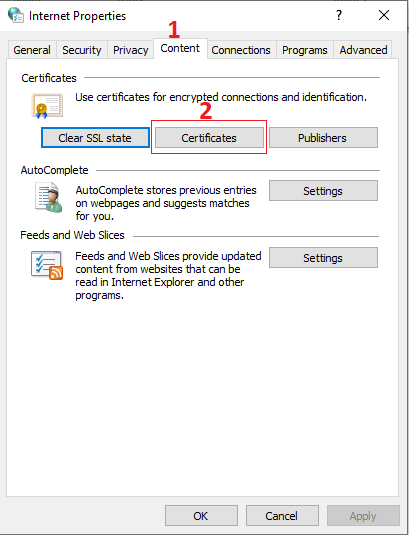
-&nbsp;Bạn&nbsp;mở hộp thoại Run&nbsp;ra (<code>Windows + R</code>) . Sau đó nhập lệnh&nbsp;<code>inetcpl.cpl</code>&nbsp;=&gt; và nhấn&nbsp;<code>Enter</code>.<br />
- Cửa sổ Internet Properties hiển thị lên. Các bạn chọn theo hình
<div class="image-center"><img alt="ssl cer" height="535" src="https://www.vinades.vn/uploads/news/2021_10/ssl_cer.png" width="409" /></div>
<br />
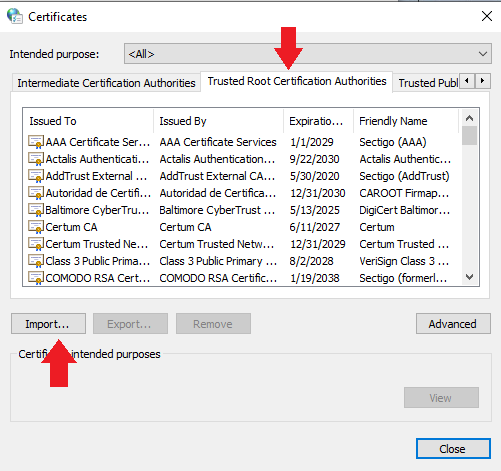
-&nbsp;Bạn có thể xem chứng chỉ hiện tại trong tab Trusted Root… =&gt; sau đó bấm vào nút&nbsp;<code>Import</code>
<div class="image-center"><img alt="ssl cer 1" height="471" src="https://www.vinades.vn/uploads/news/2021_10/ssl_cer_1.png" width="501" /></div>
- Bạn nhấn Next<br />
- Chọn Browse... tìm file bạn vừa tải vè ở bước trên<br />
- Sau đó cứ tiếp tục nhấn Next.<br />
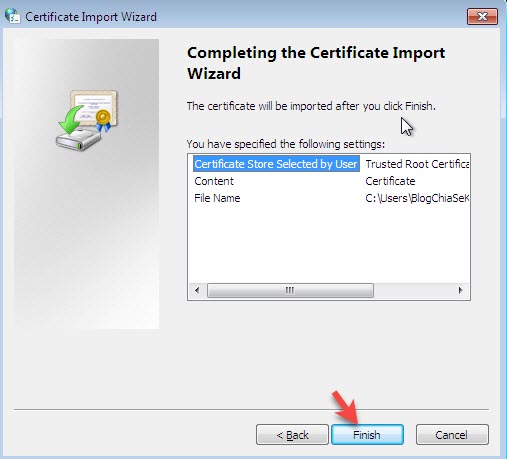
- Chọn&nbsp;<code>Finish</code>&nbsp;để kết thúc.
<div class="image-center"><img alt="sua loi ket noi cua ban khong phai rieng tu 10" height="459" src="https://www.vinades.vn/uploads/news/2021_10/sua-loi-ket-noi-cua-ban-khong-phai-rieng-tu-10.jpg" width="507" /></div>
<br />
- Một cửa sổ cảnh báo xuất hiện, bạn chọn&nbsp;<code>Yes</code>&nbsp;để đồng ý thay chứng chỉ mới là được.<br />
- Cuối cùng bạn mở trình duyệt và truy cập lại địa chỉ website mà bạn muốn truy cập trước đó để kiểm tra<br />
&nbsp;
<h2><strong>Lời kết</strong></h2>
<p>Trên đây là cách khắc phục lỗi&nbsp;<strong>“Kết nối của bạn không phải là kết nối riêng tư”</strong>&nbsp;khi truy cập một số trang web bị hết hạn chứng chỉ gốc DST Root CA X3 của Let’s Encrypt sau ngày 30/9.</p>
</div>
</div>
</div>
        </div>
                <div id="author">
                        <p>
                <strong>Tác giả:</strong>
                <a href="https://www.vinades.vn/vi/news/author/Nam-Nguyen-Luong/">Nam Nguyễn Lương</a>
            </p>
        </div>
    </div>
    <div id="footer" class="clearfix">
        <div id="url">
            <strong>URL của bản tin này: </strong><a href="https://vinades.vn/vi/news/savefile/tin-cong-nghe/khac-phuc-su-co-hang-loat-may-tinh-hoac-cac-thiet-bi-deu-bi-loi-ket-noi-rieng-tu-540.html" title="Khắc phục sự cố hàng loạt máy tính hoặc các thiết bị đều bị lỗi &quot;kết nối riêng tư&quot;">https://vinades.vn/vi/news/savefile/tin-cong-nghe/khac-phuc-su-co-hang-loat-may-tinh-hoac-cac-thiet-bi-deu-bi-loi-ket-noi-rieng-tu-540.html</a>
        </div>
        <div class="clear"></div>
        <div class="copyright">
            &copy; Công ty cổ phần phát triển nguồn mở Việt Nam - VINADES.,JSC
        </div>
        <div id="contact">
            <a href="mailto:contact@vinades.vn">contact@vinades.vn</a>
        </div>
    </div>
</div>
        <div id="timeoutsess" class="chromeframe">
            Bạn đã không sử dụng site, <a data-toggle="timeoutsesscancel" href="https://www.vinades.vn/#">Bấm vào đây để duy trì trạng thái đăng nhập</a>. Thời gian chờ: <span id="secField"> 60 </span> giây
        </div>
        <div id="openidResult" data-sso-domain="https://iportal.vn" class="nv-alert" style="display:none"></div>
        <div id="openidBt" data-result="" data-redirect=""></div>
<script src="https://www.vinades.vn/assets/js/jquery/jquery.min.js"></script>
<script>var nv_base_siteurl="/",nv_assets_dir="assets",nv_lang_data="vi",nv_lang_interface="vi",nv_name_variable="nv",nv_fc_variable="op",nv_lang_variable="language",nv_module_name="news",nv_func_name="savefile",nv_is_user=0, nv_my_ofs=-4,nv_my_abbr="EDT",nv_cookie_prefix="nv4c_d13B5",nv_check_pass_mstime=1738000,nv_area_admin=0,nv_safemode=0,theme_responsive=1,nv_recaptcha_ver=2,nv_recaptcha_sitekey="6LdXxu8UAAAAACnqvAr5Obc46cTJG8RL3M4ywBjB",nv_recaptcha_type="image",nv_turnstile_sitekey="",XSSsanitize=0,nv_jsdate_get="dd-mm-yyyy",nv_jsdate_post="dd/mm/yyyy",nv_js_am="SA",nv_js_pm="CH",nv_gfx_width="150",nv_gfx_height="40",nv_gfx_num="6",nv_cache_timestamp=1780135445;</script>
<script src="https://www.vinades.vn/assets/js/language/vi.js"></script>
<script src="https://www.vinades.vn/assets/js/global.js"></script>
<script src="https://www.vinades.vn/assets/js/site.js"></script>
<script src="https://www.vinades.vn/themes/vinades/js/news.js"></script>
<script src="https://www.vinades.vn/themes/vinades/js/main.js"></script>
<script src="https://www.vinades.vn/themes/vinades/js/custom.js"></script>
<script>jQuery.event.special.touchstart={setup:function(c,a,b){this.addEventListener("touchstart",b,{passive:!a.includes("noPreventDefault")})}};jQuery.event.special.touchmove={setup:function(c,a,b){this.addEventListener("touchmove",b,{passive:!a.includes("noPreventDefault")})}};</script>
<script type="application/ld+json">
{"@context":"https://schema.org","@type":"WebSite","name":"Công ty cổ phần phát triển nguồn mở Việt Nam - VINADES.,JSC","url":"https://vinades.vn/","potentialAction":{"@type":"SearchAction","target":{"@type":"EntryPoint","urlTemplate":"https://www.vinades.vn/vi/seek/?q={search_term_string}"},"query-input":"required name=search_term_string"}}
</script>
<script src="https://www.vinades.vn/themes/vinades/js/bootstrap.min.js"></script>
</body>
</html>